Share this article
Key takeaways
- Check customer, product, price, payment and delivery details before confirming an order.
- Use one order workflow for storefront orders and manually created social orders.
- Track delivery and returns against the original order, then review completed outcomes weekly.
If orders arrive through a website and social conversations, a seller needs one repeatable process for checking details, booking delivery and recording the final outcome. The example below is illustrative; adapt the steps to your own payment and courier rules.
What should happen before a courier is booked?
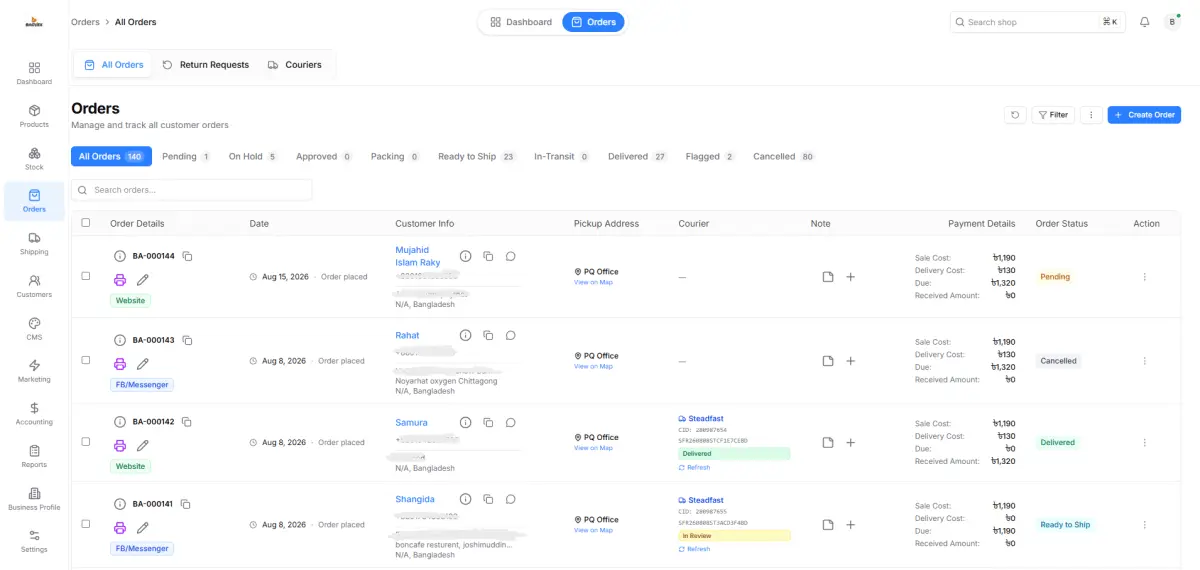
Start by checking the customer name and phone number, delivery address, product variant and quantity, selling price, payment method and any delivery charge. For a social-media order, staff may create the order manually. PQCommerze also receives orders from its storefront and connected channels, so the team can review them in the same order workflow.
For example, a Dhaka clothing seller receives a request for two sizes of the same shirt. Before confirming, staff check both variants and the delivery address. If the customer chose cash on delivery, the order record should show the amount due. This simple check helps avoid sending the wrong parcel or asking the courier to collect the wrong amount.
How do confirmation, delivery and returns fit together?
After confirming the details, update the order status and prepare fulfilment documents. PQCommerze supports sending orders to connected courier providers, generating invoices or delivery labels, and following courier updates. Record whether the parcel was delivered, cancelled, failed or returned; a return should remain connected to its original order.
| Stage | Information to check | Recorded outcome |
|---|---|---|
| Review | Customer, products, price, payment and address | Ready for confirmation |
| Dispatch | Courier choice and fulfilment documents | Delivery booked |
| Follow-up | Courier status and any return | Final outcome recorded |
What should a seller measure each week?
Count orders that were confirmed, delivered, cancelled and returned. Review which products and regions generate failed deliveries. Compare the collected amount with the order payment status. These checks are more useful than counting new orders alone because a placed order does not always become a completed sale.
Explore the PQCommerze Order Management feature for the product workflow.